Review · Brother Skitch PP1
Brother Skitch Review: Is the PP1 Worth It? What Owners Say
Brother Skitch review from Brother's spec page and Reddit owner posts: what the Artspira app requirement means, what owners complain about, and who should skip it.
Disclosure: we may earn a commission if you buy through links on this page, at no extra cost to you. As an Amazon Associate we earn from qualifying purchases. It never changes what we recommend.
This article contains affiliate links. If you buy through them, we may earn a commission at no extra cost to you. It does not change what we write, and the complaints below are here because owners made them.
Is the Brother Skitch worth it? Yes, if you want to stitch small line-art, lettering and patches onto clothes you already own, you are happy to run everything from a phone or tablet, and a 4 x 4 inch limit is fine. No, if you want a screen on the machine, if you want one machine that also sews, or if you want to bring in your own design files without paying for an app plan. Our short page on the Brother Skitch PP1 has the quick version.
We read Brother’s Skitch PP1 page and owner threads on Reddit. We have not used this machine. Here is how we research.
Key takeaways
- Brother says the Artspira app is required to use the machine. There is no screen on the machine itself.
- The app has a free tier and a paid tier. One owner calls the free tier “super limited” and the paid one “so worth it.”
- The embroidery area is 4 x 4 inches, and it only embroiders. It does not sew.
- Owner posts mention app pairing quirks, stitch density that was too loose, and thread breaks with cheap thread.
- Owners also describe it as an affordable way into machine embroidery, and one calls the machine “pretty cool.”
- These are a sample of posts, not a defect rate.
What is the Brother Skitch PP1?
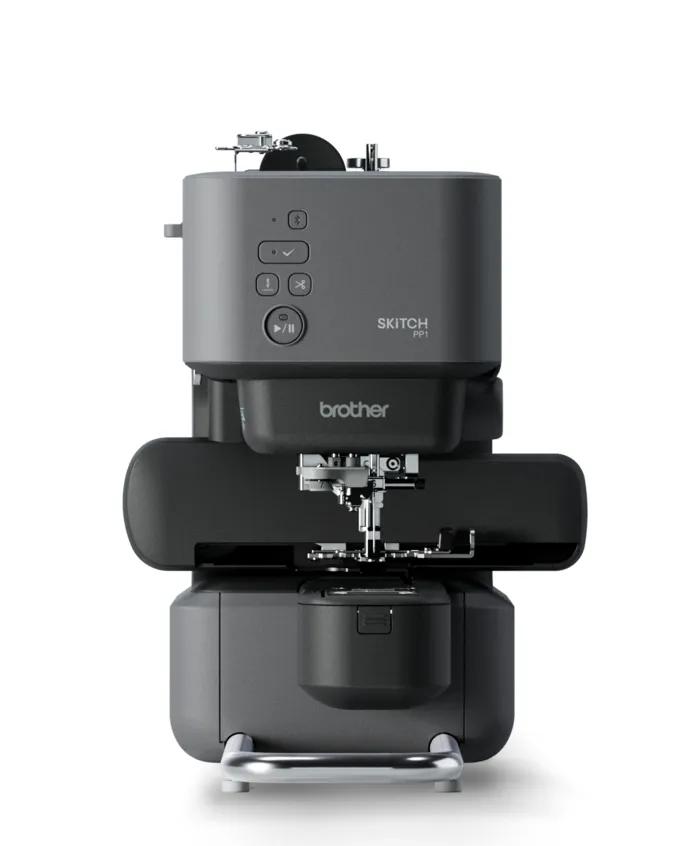
The Brother Skitch PP1 is a small single-needle embroidery machine that Brother built around a phone app. Brother’s wording is that you can “add custom embroidery designs to readymade clothes or even vintage apparel.” You draw or pick a design in the Artspira app, then send it to the machine over a wireless connection.
Per Brother, the maximum embroidery area is 4 x 4 inches (100 mm x 100 mm) and the speed is 400 stitches per minute. It has an automatic thread cutter, a quick set bobbin and thread sensors. Thread tension is manual. It weighs 16.6 lb.
Is the Brother Skitch a good embroidery machine for beginners?
It can be, if you are fine with a phone-first setup. Owners in the threads we read describe it as a starter machine, and they also describe a learning curve around stabilizer, needles and thread.
A new owner who came from sewing wrote: “I honestly think the machine is pretty cool.” (Reddit, r/Machine_Embroidery, April 2025). The same owner added: “There are some quirks with the machine that take some getting used to.”
Another owner wrote: “i want to learn more but through all the “studying” i did this seemed like the most affordable starter machine.” (Reddit, r/MachineEmbroidery, May 2024).
If you want to check current availability, here is the Brother Skitch PP1 on Amazon listing.
Do you have to pay for the Artspira app?
Not to start, per Brother, though one owner found the free tier limited. Brother states: “Artspira is required to use the machine.” Brother describes the mobile app as free in its feature text, and it also offers a paid tier.
What Brother says the free app does, and what the paid plan adds:
- Brother on the standard tier: “Artspira Standard that allows you to transfer designs from the app to the machine, use the embroidery drawing tool and browse projects.”
- Brother on the plus tier: “Artspira+ that allows you to import designs, digitize, cross stitch, browse projects and use advanced drawing tools.”
So importing your own design files is on the plus side of the line, per Brother. Check the plan terms inside the app.
One owner described the same split: “The machine requires the Artspira app on your phone and it’s worth knowing that the free version is super limited with 1 or 2 fonts and a selection of a few patterns.” They continued: “The paid version is so worth it though.” (Reddit, r/Machine_Embroidery, April 2025).
What do Brother Skitch owners complain about?
Here is a sample of posts, not a defect rate.
The app and pairing. The owner above wrote: “The Bluetooth connectivity to your phone isn’t the most user friendly and it can be a little confusing at first.”
Loose-looking stitches. An owner who made patches wrote: “So i got the skitch. And i made a few patches and it seems like i can see between the threads on most of them.” (Reddit, r/MachineEmbroidery, May 2024). They later found the cause: “I figured out that its the density of stitches. I was indeed using the stuff on artspira. But i made a pes file on inkstitch and watched tutorials. And now the stitches are tighter looking and feel better.” (Reddit, r/MachineEmbroidery, May 2024).
Thread breaks. A new owner wrote: “I bought cheap thread and it broke.” (Reddit, r/Machine_Embroidery, July 2026). They also said they do not yet understand tension and backing.
A mixed report. A dressmaker who later bought one wrote: “Yeah I have had a few issues, nothing major and re threading is pretty quick. I did have to abandon a project once though as the alignment got messed up” (Reddit, r/Machine_Embroidery, May 2025).
Closed system. A commenter who does not say they own one wrote: “The skitch “system” is basically like those pod coffee makers. Very simple to use, but a headache if you wonder too far away from its ecosystem.” (Reddit, r/MachineEmbroidery, May 2024). Treat that as an opinion, not an owner report.
Can the Brother Skitch do hats?
Brother’s product page does not list a hat hoop. It lists a flat 4 x 4 inch magnetic frame in the box, and a 3 x 3 inch magnetic hoop as a separate accessory. If hats are your main goal, check the manual on Brother’s support page first.
Does the Brother Skitch have a USB port?
Brother’s product page does not list one. It lists wireless transfer from the Artspira app. For bobbin size and threading details, which the page also does not spell out, use the manual on Brother’s support page for the PP1.
Brother Skitch vs PE545: which one fits you?
The difference is how you run the machine. The Brother PE545 has its own touchscreen and built-in designs. The Skitch is controlled from your phone. Both stop at 4 x 4 inches and neither sews. If you want to sew as well, look at the Brother SE700.
Skitch PP1 vs PE545: how you run each machine
| Brother Skitch PP1 | Brother PE545 | |
|---|---|---|
| How you control it | Artspira app on a phone or tablet | 3.7 inch color touchscreen on the machine |
| Built-in designs and fonts | Not listed on Brother’s Skitch page | 135 designs and 10 fonts |
| Maximum embroidery area | 4 x 4 in | 4 x 4 in |
| Sews | No | No |
| Frame in the box | 4 x 4 magnetic frame | 4 x 4 hoop |
| Design transfer | Wireless from the Artspira app | Wireless LAN and USB |
Unsure about size? See our guide to 4x4 or 5x7.
Who should skip the Brother Skitch?
Skip it if:
- You want a screen on the machine. Brother’s page shows only physical buttons, so you work from the app.
- You want to sew too. This is an embroidery machine only.
- You want to import your own design files without a paid app plan. Per Brother, importing sits in Artspira+.
- You need hats or designs bigger than 4 x 4 inches. Brother’s page lists neither a hat hoop nor a bigger frame.
Is the Brother Skitch worth it?
For the right buyer, yes. Owners describe it as an affordable way to start machine embroidery, and one calls the machine “pretty cool.” If you plan small line-art and lettering on clothes you own, and you are comfortable with the app, it fits.
Owners also report real friction: app pairing, a free tier one owner found limited, loose stitches until density was fixed, thread breaks with cheap thread and one abandoned project from misalignment. Our advice: try the app first, use good machine embroidery thread, and buy from a seller with a clear return window. You can see the Brother Skitch PP1 on Amazon, or read the shorter Brother Skitch PP1 overview.
Frequently asked questions
Does the Brother Skitch sew?
No. Brother names it a single-needle embroidery machine, and it only embroiders.
What comes in the box?
Brother lists a quick reference guide, scissors, a cleaning brush, a seam ripper, a needle set, 2 pre-wound bobbins, a disc-shaped screwdriver, 4 spool pressers, a 4 x 4 magnetic frame, an electric cord, black thread, felt and backing material.
What size is the embroidery area?
Brother lists 4 x 4 inches (100 mm x 100 mm) as the maximum.
What warranty does Brother list?
Brother’s product page shows a 1/2/25 year limited warranty. Brother’s warranty document says what each term covers.
How fast does it stitch?
Brother lists 400 stitches per minute.
Your options
Ready to check it?
Affiliate links. We may earn a commission at no extra cost to you.
Last checked: 2026-11-11. Specifications and availability checked against the manufacturer and retailer pages on this date. Prices change often, so the retailer page always wins.