Square Golf Home Edition launch monitor
Play real golf in a spare room, putts and chips included
The Square Golf Home Edition is a camera-based launch monitor that sits beside the ball, built for indoor setups. It is for golfers who want full swings, chips and putts read in a small room, without a yearly fee, and this page is plain about its limits.
- High-speed camera with machine vision, per Square Golf
- Up to 8 hours on a single charge
- No subscription fee, with 1,000 free credits, per Square Golf

Sound familiar?
Winter, a small room and no way to play
The season ends and your game goes on hold until spring. The launch monitors you read about want a long room behind the ball, an outdoor range or a yearly membership. You want something that fits beside the ball in a spare room or a garage, reads your chips and putts too, and lets you play a round on a weeknight.
“It is an amazing value for a launch monitor that you can actually use indoors in a limited space.”
- What it costs to leave it unsolved
- You lose months of practice every winter
- You buy a radar unit and find out your room is too short
- You pay a membership every year just to keep playing courses
The way out
A camera beside the ball, built for indoors
Square Golf says the Home Edition combines machine vision technology with a high-speed camera to measure golf shots. Marked golf balls let it read back spin and side spin, and a marker on the club shaft gives club feedback. It connects by Bluetooth to phones, tablets and PCs, and a swing stick lets you practice and play in the living room without hitting a ball.
A compact camera launch monitor that sits beside the ball, built for indoor rooms, with no subscription fee.
-
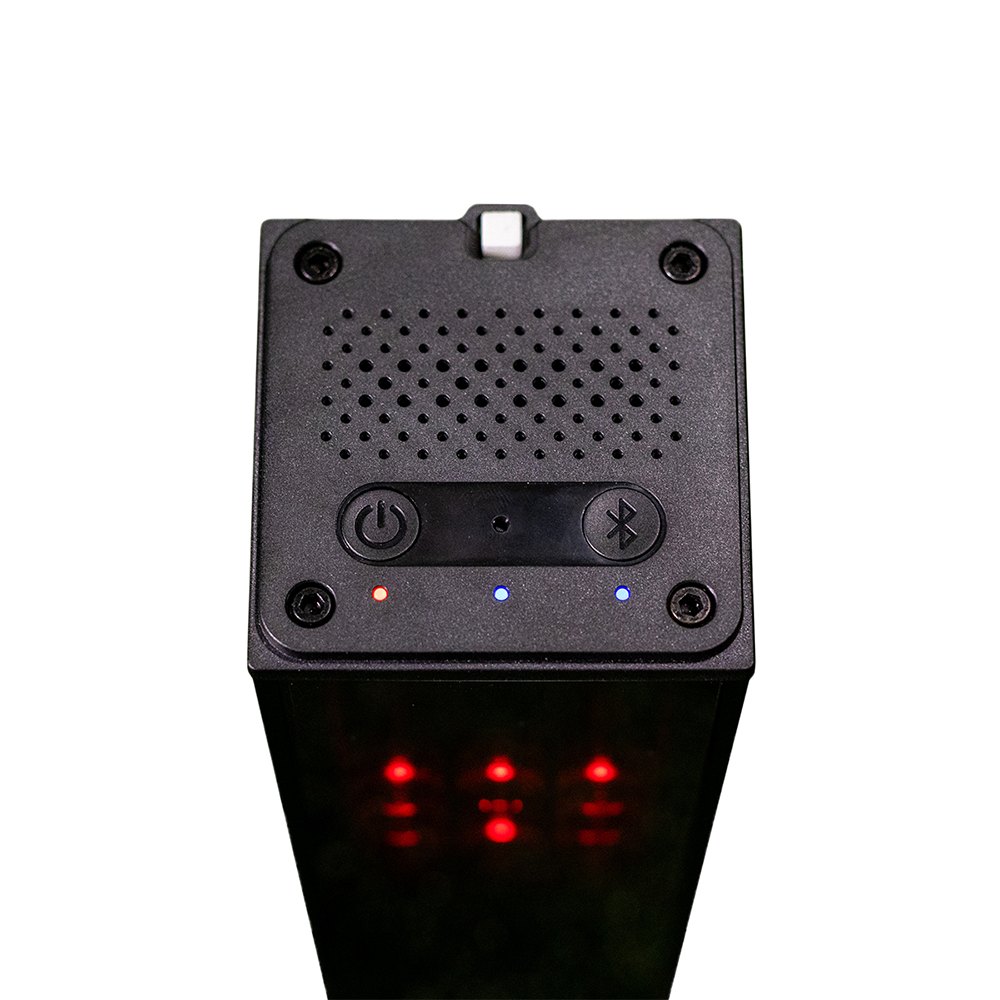
Set it beside the ball
Stand the tower on the mat to the side of the ball and line it up with the target, then charge the battery for up to 8 hours of play.
-
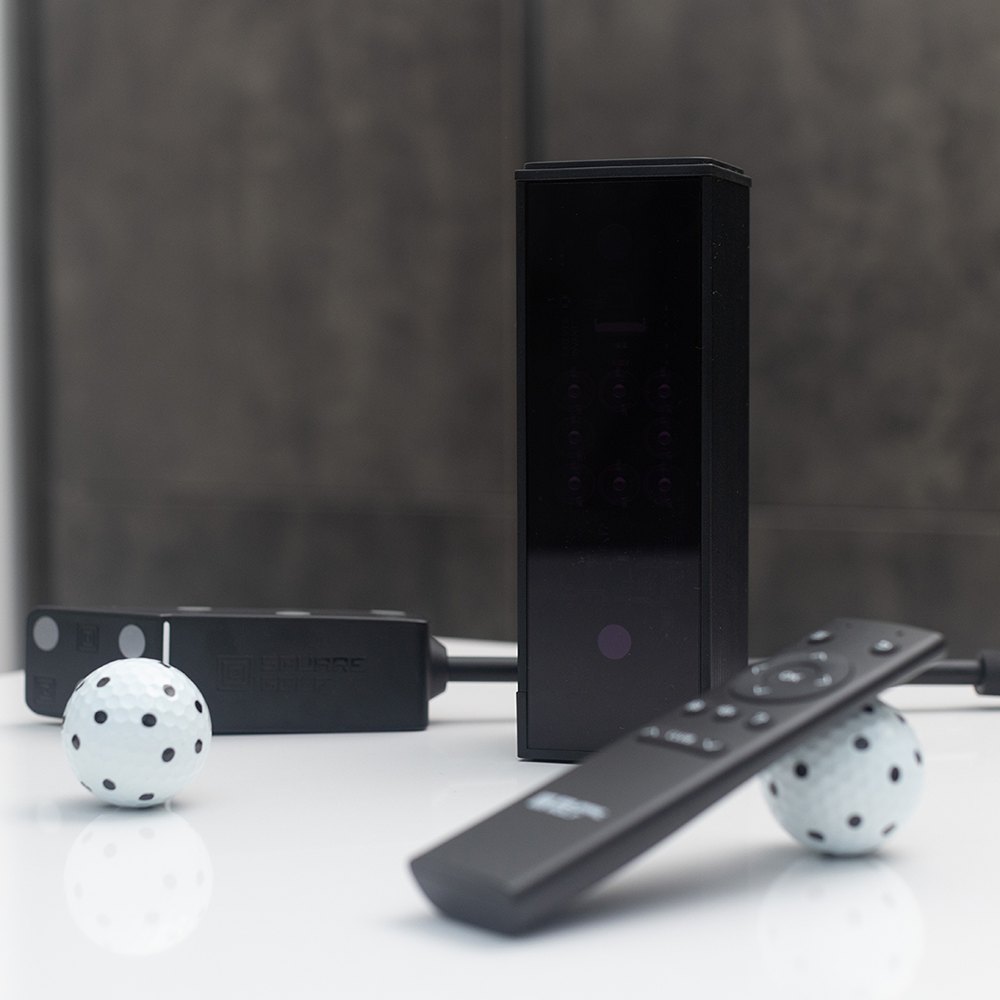
Hit marked balls
Use the marked balls in the box so the camera can read back spin and side spin, and add the club marker for swing feedback.
-
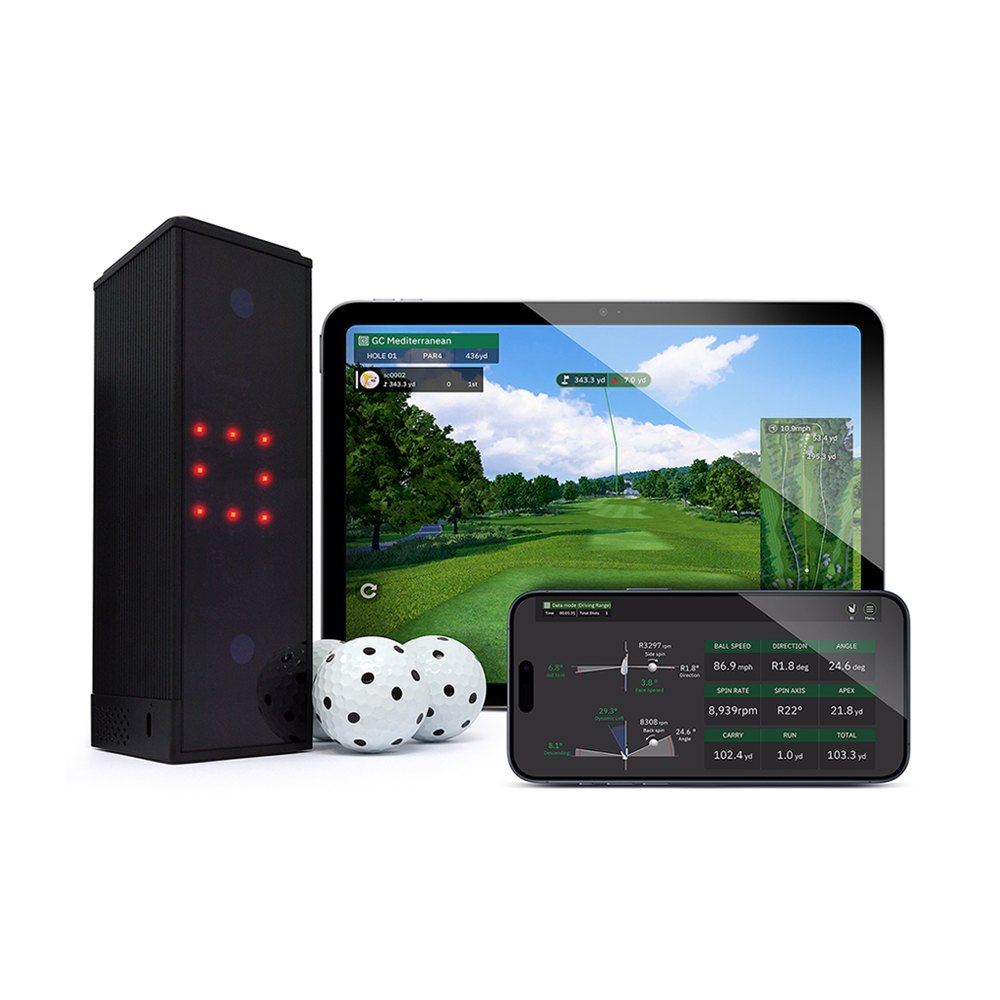
Play on your phone, tablet or PC
Connect by Bluetooth and play the native courses, driving range and putting, or a third-party simulator on a PC.
The Square Golf Home Edition, up close
Official Square Golf images. Tap any image to enlarge.
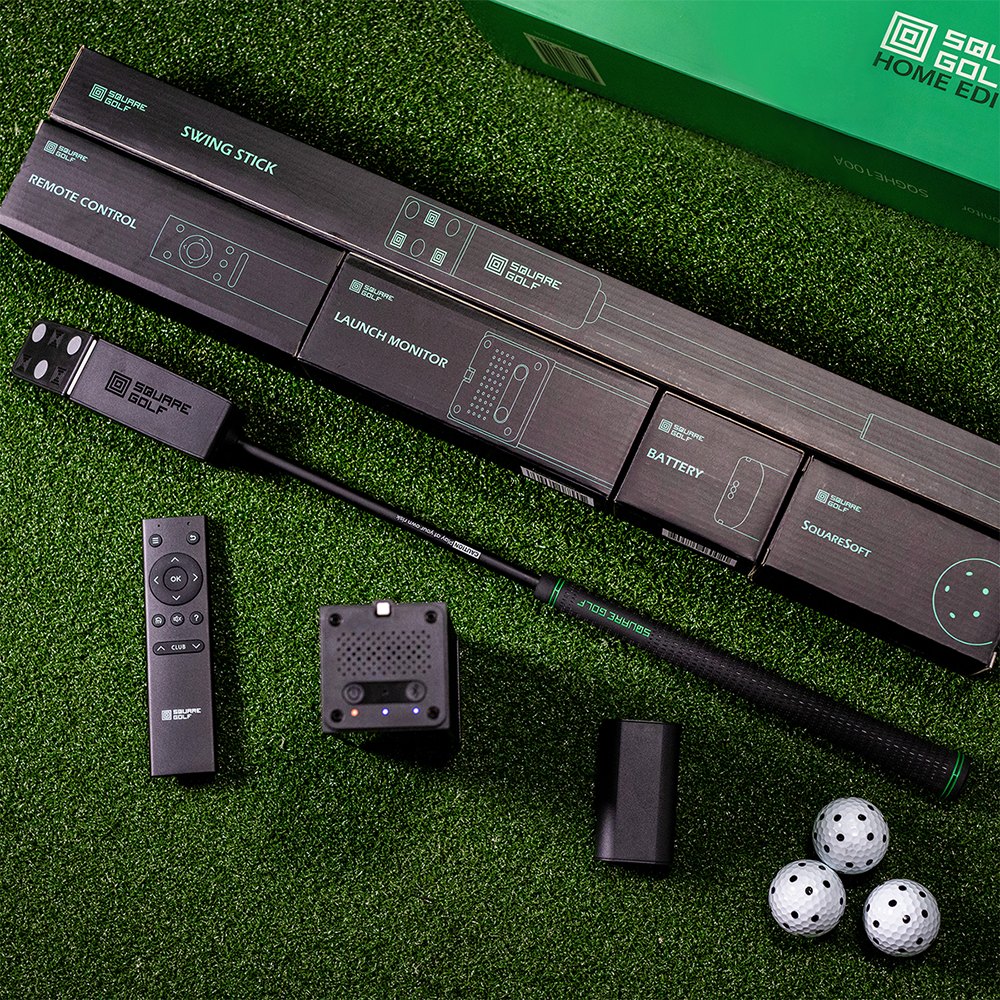
What you actually get
What the Home Edition does for your game
Each benefit comes from Square Golf's own page or from an owner who has one.
Spin read off the ball
Square Golf says the dedicated marked ball gives precise back spin and side spin, read by a high-speed camera with machine vision.
Club feedback with a sticker
A marker attached to the club shaft gives feedback on your swing, per Square Golf.
Short game indoors
One owner says full shots, chipping and putting all read as they would expect, and another calls it fantastic for putting and short game practice.
Practice without a ball
The included swing stick lets you practice and play games in a living room, with its path and face measured, per Square Golf.
No cables during a session
A high-capacity battery rated for 8 hours on a single charge, per Square Golf.
No yearly fee
Square Golf lists the Home Edition with no subscription fee and 1,000 free credits for its native course play.
Before you order
Seven details owners and Square Golf say matter with the Home Edition
Owners like how much it does in a small room, and they agree on what to plan for. Each line comes from Square Golf or from a person who owns one.
- It is an indoor unit
Square Golf calls it a launch monitor built for indoor environments, and one owner says Square has stated outdoor use can damage the cameras.
- Keep light off its face
One owner with a window behind it says it works, but it cannot take direct light on its face.
- Use real, marked balls
Square Golf says the marked ball is what gives back spin and side spin, and one owner says a real ball is needed because the sound of contact starts the read.
- A phone or tablet is enough to start
Owners connect it by Bluetooth to a phone or iPad and cast to a TV or projector, and add a PC only for GSPro.
- Credits for native courses
Square Golf lists 1,000 free credits and no subscription fee. A dealer's listing notes that native course play uses credits, while practice modes are free.
- Think about where you buy
Buyers in an October 2026 thread report slow deliveries and hard support when ordering directly from Square, and chose a dealer.
- Protect it from bounce-backs
One owner recommends buying a steel enclosure for the unit, and Square sells a protective case.
None of this is a dealbreaker for most indoor golfers, but it is the part the product page does not shout. We have not tested the unit ourselves.
Built from: Square Golf Home Edition page, Square Golf home page (price line and credits), r/Golfsimulator thread, Square golf monitor, worth it?, r/Golfsimulator thread, Square Home Edition. How we research
Owners, in their own words
What owners say, good and bad
Owners quoted word for word from public forums and the maker's site. Each quote links to where it was posted.
“I think it is accurate, simple to set up and use.”
“I switched from the R10 and it’s significantly better.”
“Full shots, chipping, putting, all read as I would expect.”
“Have had one blatantly horrible misread in the entire time”
“Just remember, bad customer service.”
What is included
What arrives in the box
These are the components Square Golf lists for the Home Edition.
- Launch monitor Camera-based unit that sits beside the ball
- Swing stick For practice and games without hitting a ball
- Li-ion battery Up to 8 hours on a single charge
- Remote control To change clubs and modes
- 3 Square Golf marking golf balls Marked balls the camera uses to read spin
Your first month
What owners add in the first month
The monitor is the start. These are things the official page or owners mention.
Golf hitting mat
One owner says their setup cost under US$1,500 with a top of the line mat, and the unit sits on the mat beside the ball.
See optionsGolf net or impact screen
Owners hit into nets such as a Spornia in garages and spare rooms.
See optionsMarked golf balls
Square Golf says the marked ball gives precise spin, and only 3 come in the box.
See optionsTablet stand
One owner places an iPad on a stand next to the hitting area to see the course.
See optionsProtective case for the monitor
One owner recommends a steel enclosure, and Square sells a protective case for the unit.
See optionsBuy without the knot in your stomach
How to buy it with confidence
Where you buy
Several buyers in an October 2026 r/Golfsimulator thread describe slow delivery and hard-to-reach support when ordering directly from Square, and chose a dealer instead. On Amazon, check who the seller is and the return window shown on the listing.
Indoors only
Square Golf describes the Home Edition as built for indoor environments. One owner says Square has stated that outdoor use can damage the cameras, so do not plan to take it to the range.
The right listing
Look for the Square Golf Home Edition, new. Amazon also shows pre-owned units, and the Square Golf Omni is a different, pricier model for indoor and outdoor use.
Check the box
When it arrives, check the monitor, swing stick, battery, remote and the 3 marked balls against the list above.
Checked on November 8, 2026
Specifications and availability were checked against the manufacturer and Amazon pages on this date. Store prices change by the hour, so the price at checkout is the one that counts. How we research
Still deciding?
Questions people ask before buying
Is the Square Golf launch monitor any good?
Owners in r/Golfsimulator mostly like it for indoor play: they call it accurate and simple to set up, and good for chipping and putting. The complaints are about customer service when buying direct, the odd misread, and wanting more club data. We have not tested it ourselves.
Do you need a subscription for Square Golf launch monitor?
No. Square Golf lists the Home Edition with no subscription fee and 1,000 free credits. A dealer's listing notes that native course play uses credits while practice modes are free, and third-party software such as GSPro has its own cost.
What golf balls can be used with the Square launch monitor?
Square Golf says its dedicated marked balls give precise back spin and side spin, and 3 come in the box. One owner adds that you need a real golf ball, because the sound of contact tells the device to start processing the shot.
Can the Square Golf Home Edition be used outdoors?
It is built for indoors. Square Golf calls it a launch monitor built for indoor environments, and one owner says Square has stated outdoor use can damage the cameras. Owners also say direct light on its face causes problems.
Which is better, SkyTrak or Square Golf launch monitor?
We have not tested either, so we do not rank them. The Square sits beside the ball and is built for indoor rooms with no subscription fee. Compare the room each needs and what each costs to run over two or three years.
Is the Square better than the Garmin R10?
They are different tools. The R10 is a radar unit that sits behind the ball and needs more room, while the Square is a camera unit beside the ball. One owner who switched from the R10 says the Square is significantly better for them. Read our Garmin Approach R10 page too.
Do I need a gaming PC for the Square Golf launch monitor?
No. Owners say they connect it by Bluetooth to a phone or iPad and play the native courses, and some cast to a TV or projector. A PC is only needed for third-party software such as GSPro.
Your winter rounds start the day the box arrives
Clear a spot beside the ball, keep direct light off the unit, put a marked ball down and hit your first session. Then pick a course.
Price and stock change on Amazon, so check the current listing and the seller.