Cricut Maker 5 smart cutting machine
Shirts, cards, leather and wood from one small machine
The Cricut Maker 5 is Cricut's most versatile cutting machine, released in September 2026. It is for crafters who want to go past vinyl and cardstock into leather, foam board and engraving, on a desk that does not have room for a big machine.
- Works with 300+ materials and 13 tools, per Cricut
- Cuts and engraves materials up to 3 mm thick
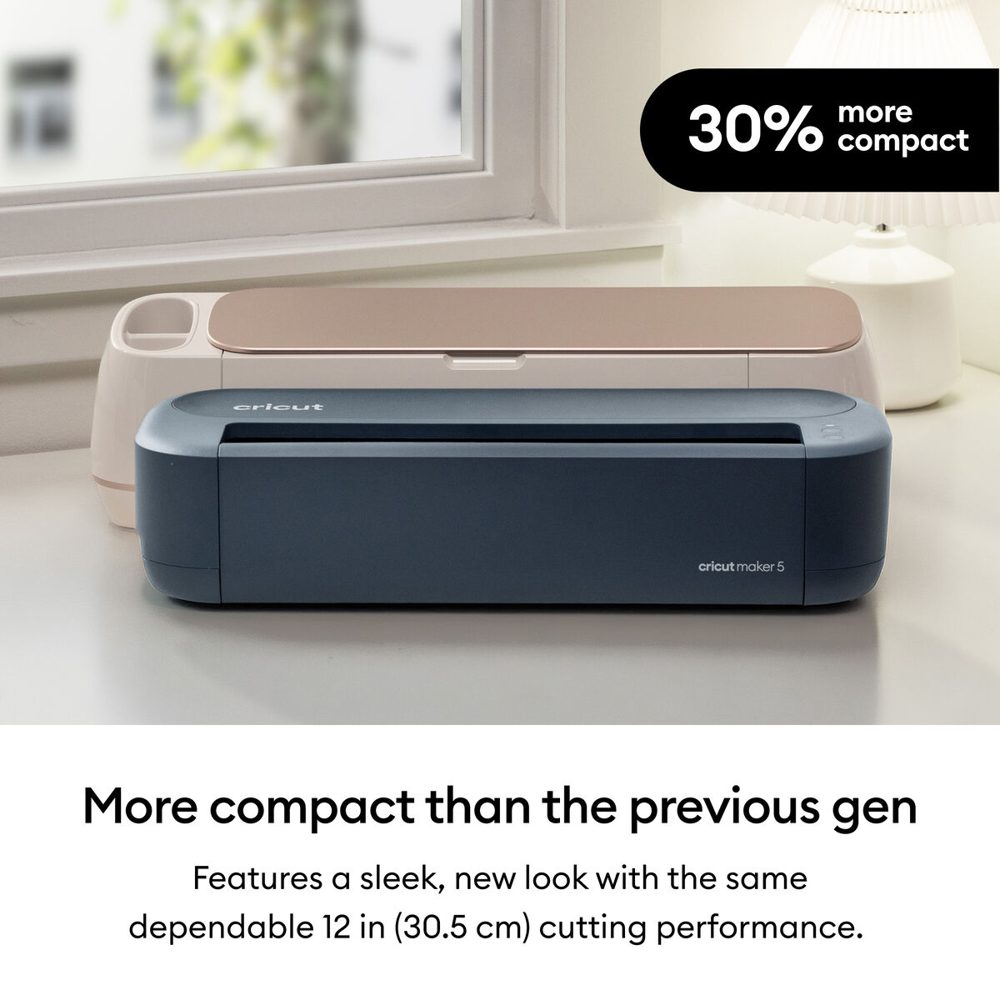
- 30% more compact than previous models, 10.9 lb

Sound familiar?
Your craft ideas outgrew your machine
You started with vinyl decals and cards. Now you want leather keychains, engraved gifts, wood signs and fabric pieces, and a smaller machine says no. Meanwhile your craft corner is a desk, not a studio, and a bulky machine eats the space you work in.
“I was only making vinyls and stencils with the joy…but I have so many more things I can do now!”
- What it costs to leave it unsolved
- Projects you plan but cannot cut
- Paying a shop for engraving and thick materials
- A desk crowded by the machine instead of the project
The way out
More materials, less desk
Cricut says the Maker 5 cuts everything from delicate fabric and paper to wood, engraves metal and debosses leather. Its clearance takes approved materials up to 3 mm thick, it works with 13 tools, and it keeps a 12 inch cutting width in a body Cricut calls 30% more compact than previous models. Smart Materials load without a mat for cuts up to 12 feet, and Print Then Cut makes full color stickers from your home printer.
Cricut's most versatile cutting machine, now able to take 3 mm materials, in a smaller body.
-
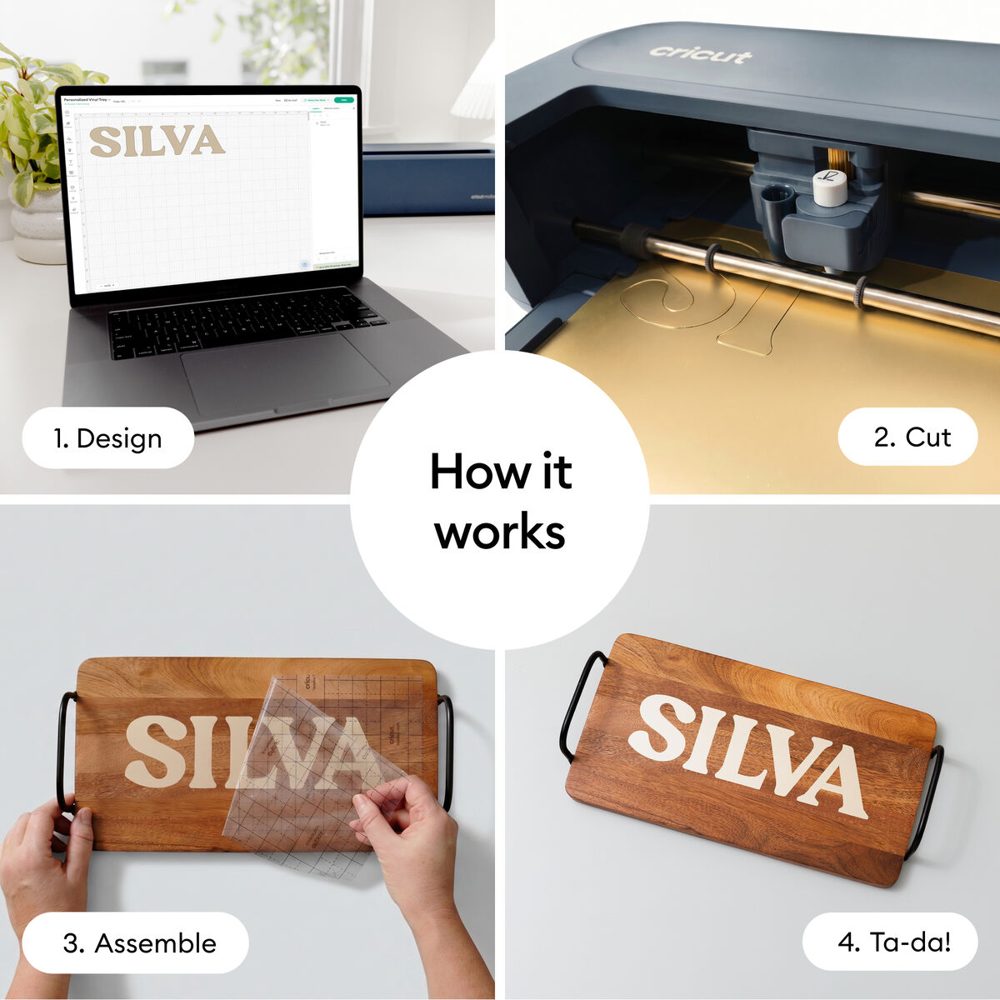
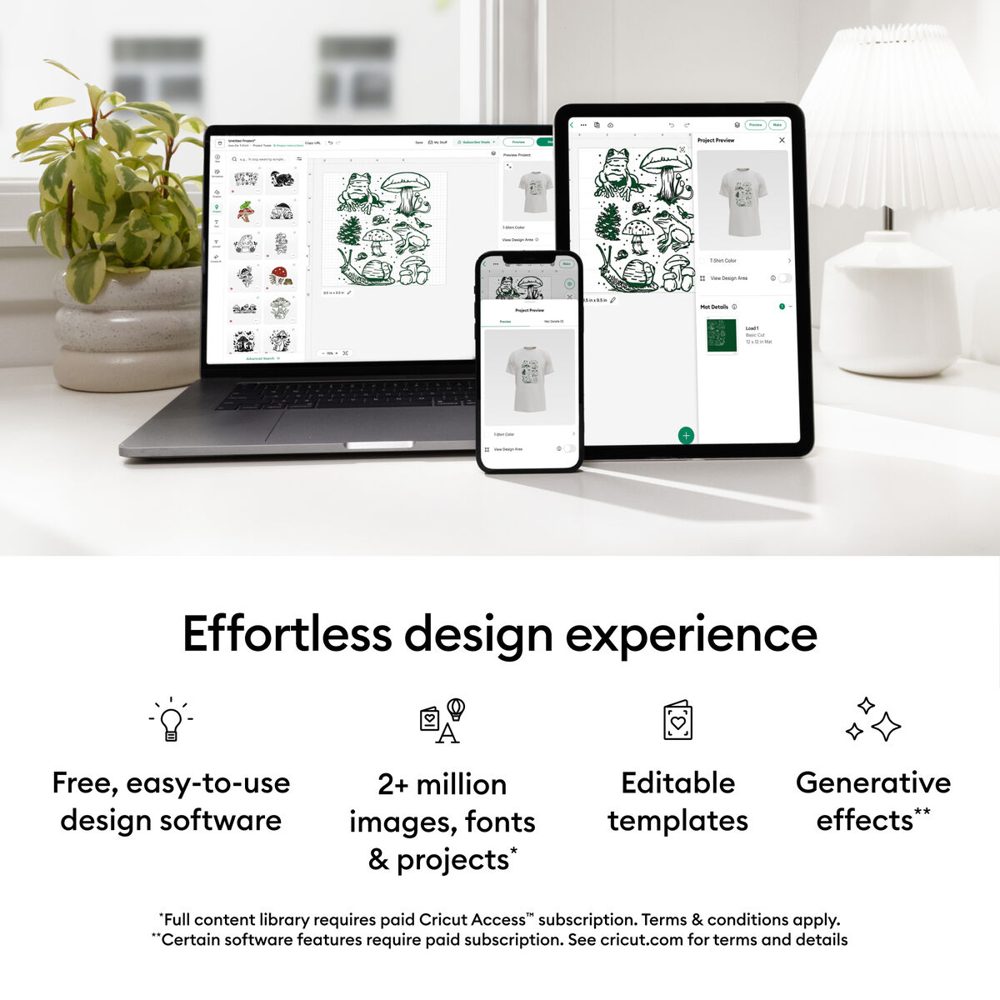
Design it
Use Design Space, Cricut's free app, on a computer or phone. The full content library needs a paid Cricut Access subscription.
-
Cut, write or engrave
Load material on a mat, or Smart Materials without one, and pick the tool. Thicker materials up to 3 mm need the right tool.
-
Finish your project
Weed, transfer and assemble. Cricut says the box includes supplies for up to 30 projects.
The Cricut Maker 5, up close
Official Cricut images. Tap any image to enlarge.
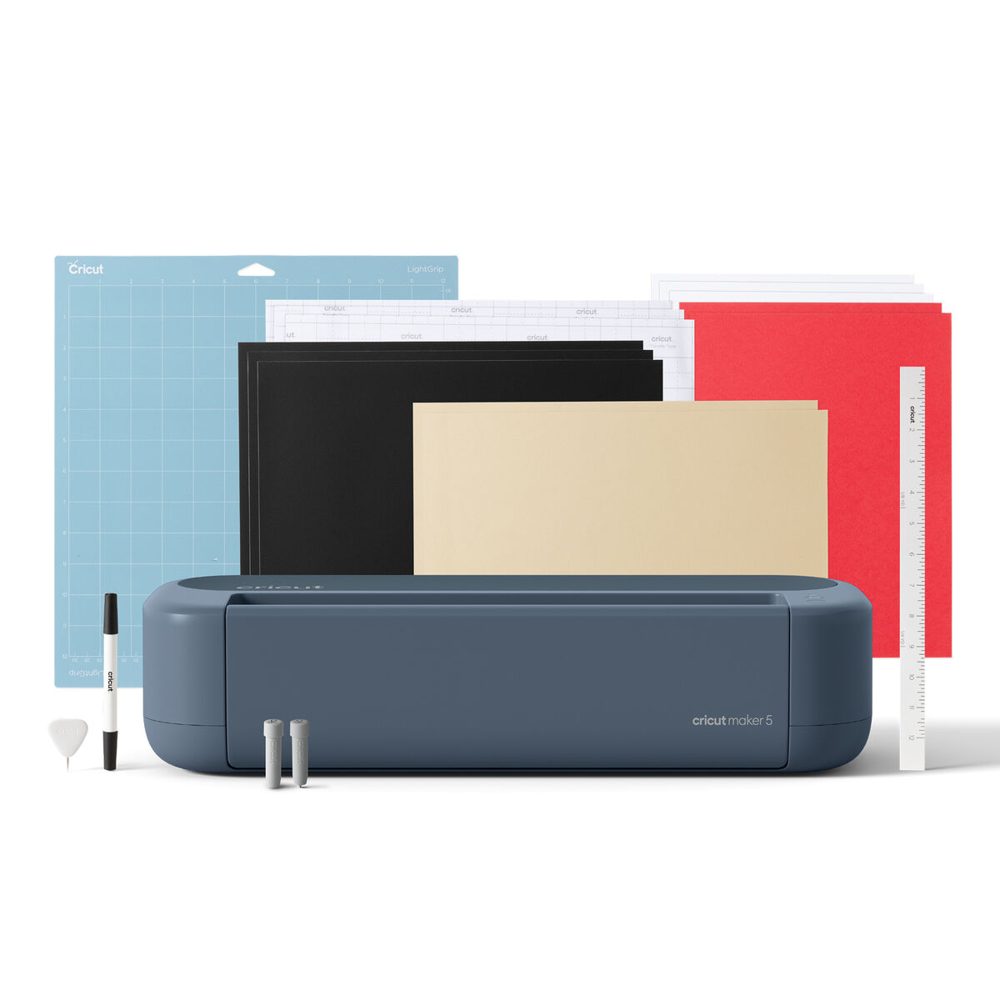
What you actually get
What the Maker 5 does for your projects
Each benefit comes from Cricut's own page or from an owner who has one.
Thicker projects
Cuts approved materials up to 3 mm, like leather and foam core board, and engraves metal and acrylic up to 3 mm, per Cricut (some tools sold separately).
One machine, many jobs
Works with 13 tools to cut, engrave, write, draw, foil, score and deboss, per Cricut.
Fits a small craft corner
Cricut lists it at 19.8 by 7.5 by 4.7 inches and 10.9 lb, 30% more compact than previous models.
Long decals without a mat
Smart Materials load straight in for cuts up to 12 inches by 12 feet, per Cricut.
Full color stickers
Print Then Cut works with your home printer for stickers and decals, per Cricut.
Ready on day one
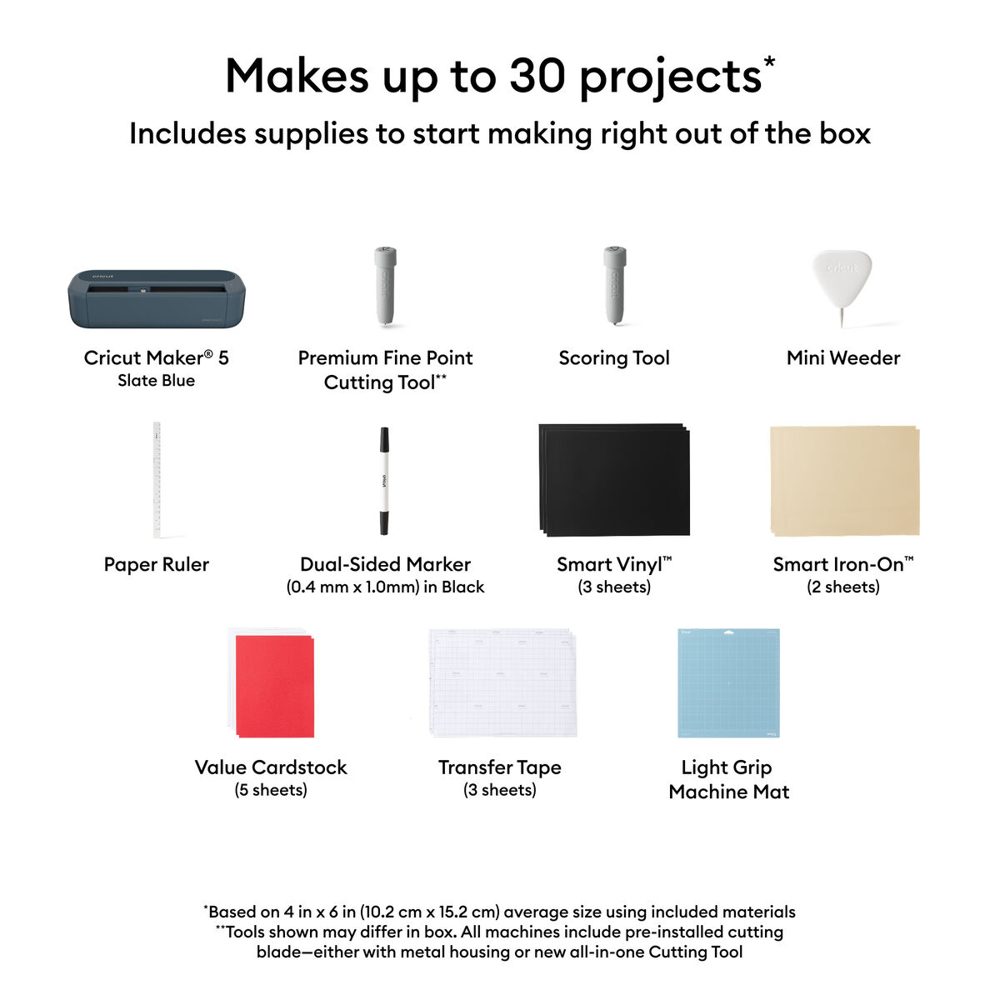
The machine ships with a fine point blade, scoring tool, marker, mat and starter materials, per Cricut.
Before you order
Seven things new Maker 5 owners ran into in the first weeks
The Maker 5 has been out since September 2026, and r/cricut is already full of first projects. These are the changes and surprises owners and Cricut mention, each with a source.
- The thickness jump
Cricut says 3 mm for cuts and engraving; the r/cricut launch thread notes the old Maker limit was 2.4 mm.
- New pen holder
The launch thread says the pen side car replaces the old accessory clamp, and one owner found her 0.4 infusible ink pens do not fit.
- Tiny details
One owner of a Joy Xtra and a Maker 5 says the smaller machine handles small, intricate details better, even after a replacement unit.
- Intricate setting
Another owner says the Maker 5 no longer shows the intricate cardstock setting she used before.
- Mat for detail
The same intricate cuts owner says cutting with a mat gives better results than Smart Vinyl without one.
- Desk space
Cricut lists 19.8 by 7.5 by 4.7 inches and 10.9 lb, and calls it 30% more compact than previous models.
- Library costs extra
Design Space is free, but Cricut says the full library of images and projects needs Cricut Access.
None of this is a dealbreaker for most crafters moving up from a smaller machine, but it is what the product page does not say. We have not tested the machine ourselves.
Built from: Cricut Maker 5 product page, r/cricut, Maker 5 official launch discussion, r/cricut, Is the Cricut Maker 5 bad at cutting intricate designs, r/cricut, Found my first dislike of the Maker 5, r/cricut, Help, Maker 5 issues. How we research
Owners, in their own words
What owners say, good and bad
Owners quoted word for word from public forums and the maker's site. Each quote links to where it was posted.
“I am throughly enjoying it!”
“Got the Maker 5 about two weeks ago and have been creating nonstop.”
“Obsessed with how it came out!!”
“the Joy Xtra seems to handle detailed designs much better than the Maker 5.”
What is included
What arrives in the box
These are the items Cricut lists for the Maker 5 (machine option). Bundles add more materials.
- Cricut Maker 5 machine Slate Blue
- Premium Fine-Point Blade and Housing Pre-installed in the machine
- Scoring Tool and Dual-Sided Marker Marker in 0.4 mm and 1.0 mm, black
- LightGrip Machine Mat 12 by 12 inches
- Starter materials Smart Vinyl, Smart Iron-On, transfer tape and cardstock, plus a mini weeder and ruler
- USB cable and power adapter Plus a free trial of Cricut Access for new customers
Your first month
What owners add in the first month
The machine is the start. These come from Cricut's page or from owners.
Extra cutting mats
One owner logged close to 100 hours on the first mat in two weeks and bought a standard and a strong grip mat.
See optionsKnife blade
Cricut says the knife blade cuts thicker, denser materials up to 3 mm like leather and foam core board.
See optionsEngraving tool
Cricut lists an engraving tool for materials up to 3 mm, sold separately.
See optionsUniversal pens
Owners say the new snap-in holder is built around Cricut's universal pens.
See optionsSmart Vinyl roll
Smart Materials load without a mat for long cuts, per Cricut.
See optionsBuy without the knot in your stomach
How to buy it with confidence
The right listing
The Maker 5 sells alone and in bundles. The Amazon listing we link is the Essential Bundle, so check which bundle and color you are getting.
Pens and tools
Owners say the new snap-in pen holder takes Cricut's own universal pens and that older 0.4 infusible ink pens do not fit. Check pen and tool compatibility at Cricut before you buy extras.
Warranty
Cricut lists a manufacturer warranty in the box. Read the terms at cricut.com, and check the seller and return window on the Amazon listing.
Check the box
When it arrives, check the blade, scoring tool, marker, mat and starter materials against the list above.
Checked on November 9, 2026
Specifications and availability were checked against the manufacturer and Amazon pages on this date. Store prices change by the hour, so the price at checkout is the one that counts. How we research
Still deciding?
Questions people ask before buying
Is Cricut Maker 5 worth it?
Yes, if you want to cut or engrave thicker materials up to 3 mm, use many tools, and save desk space. If you mainly cut small, intricate vinyl and already own a Joy Xtra or Maker 4, the upgrade is smaller, and one owner says the Joy Xtra cuts tiny details more cleanly.
Is Cricut 4 or 5 better?
For thick materials, the 5. Cricut says the Maker 5 cuts and engraves up to 3 mm and is 30% more compact; one owner thread notes the Maker 4 limit was 2.4 mm. Both have a 12 inch cutting width. See our Cricut Maker 4 page to compare.
What can I make with a Cricut Maker 5?
Decals, iron-on shirts, cards, full color stickers, leather keychains, engraved ornaments, fabric pieces and signs, per Cricut. Some of these need specialty tools sold separately.
What's the newest Cricut maker out?
The Cricut Maker 5. Cricut introduced it on its blog on September 3, 2026.
Does the Cricut Maker 5 need a subscription?
No. Design Space is free. Cricut says the full content library, with millions of images and projects, needs a paid Cricut Access subscription, and new customers get a free trial.
Can the Cricut Maker 5 cut without a mat?
Yes, with Smart Materials. Cricut says they load straight in for cuts up to 12 inches by 12 feet. One owner reports cleaner results on a mat for detailed designs.
How big and heavy is the Maker 5?
Cricut lists 19.8 by 7.5 by 4.7 inches and 10.9 lb, 30% more compact than previous models.
Your first leather keychain is closer than you think
Pick the bundle you need, clear a spot on your desk, open Design Space and cut your first project.
Price and stock change on Amazon, so check the current listing, the bundle and the seller.