Review · Cricut AutoPress 2
Cricut AutoPress 2 Review: Worth It for the 15 x 15, and Who Should Skip It
Cricut AutoPress 2 review (15 x 15) built from Cricut's pages and creator videos: what it does, what changed, the limits, and who should skip it.
Disclosure: we may earn a commission if you buy through links on this page, at no extra cost to you. As an Amazon Associate we earn from qualifying purchases. It never changes what we recommend.
This article contains affiliate links. If you buy through them, we may earn a commission at no extra cost to you. It does not change what we write, and the limits below are here because they matter to a buyer.
Is the Cricut AutoPress 2 (15 x 15) worth it? Yes, if you press shirts, sweatshirts or tote bags in batches, you use HTV, DTF, puff iron-on or sublimation, you want to set the pressure yourself, and you have a permanent spot on a table for a 42 lb machine. No, if you press a few items a year, you need mugs, hats or tumblers, you have no dedicated ventilated space, or you only want the cheapest way to start.
Here is how we know what we know. This article is built from Cricut’s official product page and blog, and from YouTube reviews by creators, several of whom say Cricut sent them the unit. Nobody at CandorPicks has used this machine. When we checked on November 1, 2026, Reddit had no owner posts about the AutoPress 2 yet, so there is no long-term owner feedback to quote. For the short version, see the Cricut AutoPress 2 page.
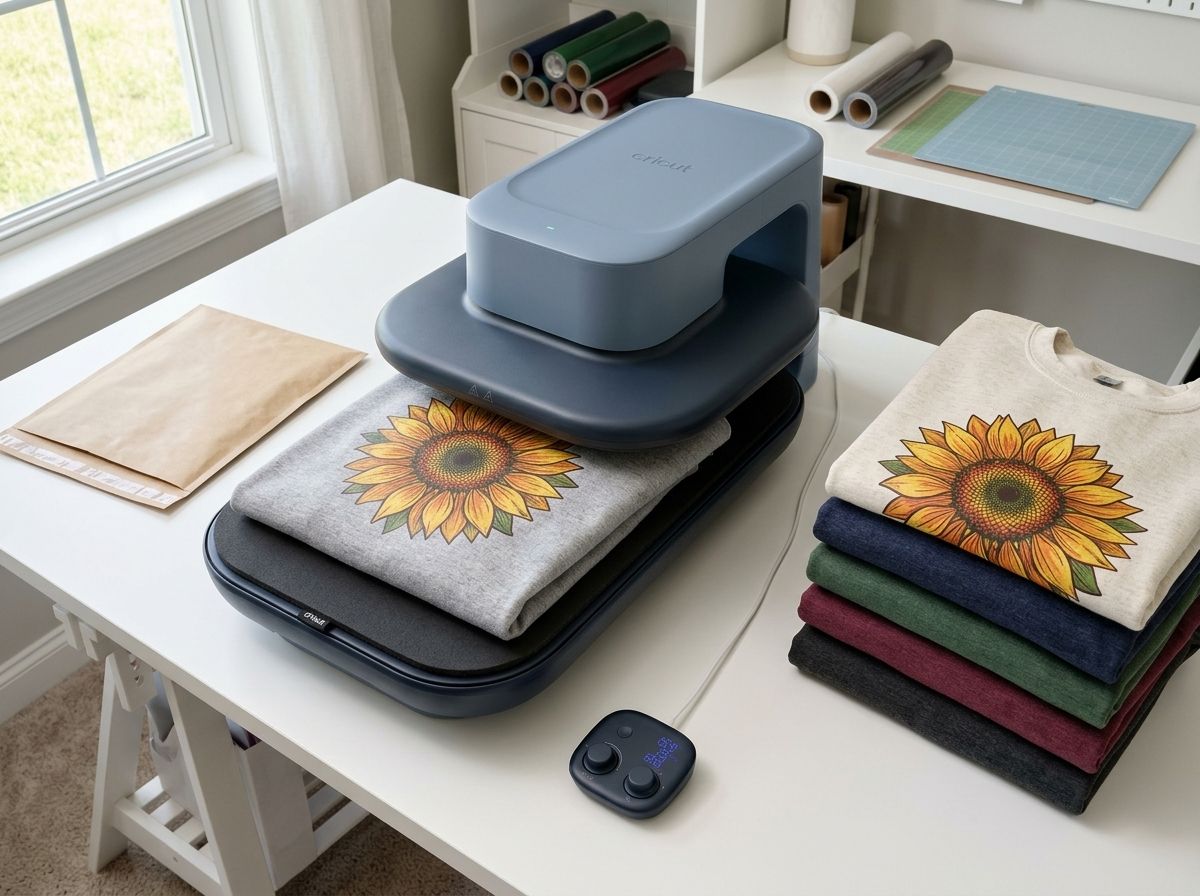
What does the Cricut AutoPress 2 do, per Cricut?
All specs below come from Cricut’s AutoPress 2, 15 x 15 product page and Cricut’s launch blog post (July 28, 2026), both read on November 1, 2026:
- An automatic tabletop heat press for flat projects.
- A 15 in x 15 in heat plate.
- Adjustable pressure up to 220 lbs, in steps of 5 lbs.
- Adjustable temperature from 212 F to 410 F, with dry, edge-to-edge heat.
- Auto Mode: hands-free operation made for batches. It adjusts its height on its own for materials up to 1.8 in thick.
- 4 customizable presets.
- Control from the movable Control Pod (3.5 ft cable) or over Bluetooth from the Cricut Design Space app. The Bluetooth connection needs internet. Cricut’s FAQ says Design Space is not required.
- An interactive Heat Guide with settings by material, in Design Space or at cricut.com/heatguide.
- Safety: an insulated Safety Base, a full slide-out tray, and Auto-Off after 15 minutes idle.
- Materials Cricut lists: DTF, Iron-On (HTV) including Puff Iron-On, Infusible Ink and sublimation.
- Weight: 42 lbs. Cricut says to use it indoors, in a ventilated area, on a flat, stable surface.
- In the box: the press, the Control Pod, a non-slip 15 x 15 Pressing Mat (“may vary”), and the manufacturer’s limited warranty. Terms are at cricut.com/warranty, and we are not stating a warranty length because the product page does not.
The Cricut AutoPress 2 on Amazon is the listing to check for current details.
What changed from the original AutoPress?
Per Cricut’s blog and product page, the differences are real:
- Plate size: the original had a 15 x 12 plate. The AutoPress 2 is 15 x 15.
- Pressure: the original sat at about 50 lbs and was not adjustable. The AutoPress 2 goes up to 220 lbs.
- Design: the original was a clamshell. The AutoPress 2 has a tray that slides all the way out.
- Entry cost: Cricut’s launch blog lists a lower starting price for the AutoPress 2 than the original had at launch. We are not printing prices here, because they change. Check the current listing.
The adjustable pressure is the change creators talk about most, because DTF and puff iron-on are the materials that tend to need more of it.
What do reviewers like?
These are YouTube creators describing their own videos. Read them as first impressions from people who tried it, not as long-term ownership.
Jennifer Maker wrote: “The new Cricut Autopress 2 fixes the biggest limitation of the original model: you can finally adjust the pressure.” She also wrote: “I tested the new Cricut Autopress 2 heat press with DTF, puff iron-on, and sublimation” (YouTube, July 28, 2026).
Kayla’s Cricut Creations wrote: “Cricut sent me the AutoPress 2 15 in x 15 in to try out”. Her projects were a DTF batch on t-shirts, a sublimation sweatshirt, and a large tote bag using the full 15 x 15 plate (YouTube, July 28, 2026).
Angie Holden wrote: “Cricut did send me this press to create content; however, this video is not sponsored.” Her description adds that the video covers “how the Cricut Autopress 2 handles various materials” (YouTube, July 28, 2026). In October she posted a comparison with two other automatic presses, saying: “I have used all three machines so I can share my honest thoughts on how they handle different projects.” (YouTube, October 6, 2026).
Hey Let’s Make Stuff wrote: “The Cricut AutoPress 2 is here, and it is a full rebuild, not just a minor update to the original Cricut AutoPress.” (YouTube, July 29, 2026).
Corinne Blackstone pressed DTF, sublimation, plain HTV, layered HTV and puff HTV on shirts and sweatshirts. Her disclosure reads: “Cricut sent me the AutoPress2 for review. As always, all opinions are my own.” (YouTube, July 28, 2026).
Makers Gonna Learn also posted a buyer-focused video titled “Cricut AutoPress 2: Watch This Before You Buy (Honest Take)” (YouTube, August 23, 2026). We only read the title, so we are not saying what it concludes.
What should you know before buying?
It is heavy and needs a home. Cricut lists 42 lbs and says to use it in a ventilated indoor space on a flat, stable surface. If you would have to carry it out of a closet for each session, that matters.
Flat projects only. The heat plate is flat. It is not a mug, hat or tumbler press. If those are your main products, you need a different tool.
Bluetooth is optional, internet is not optional for it. Control over Bluetooth through Design Space needs internet. The Control Pod works without it, per Cricut.
It is new. Cricut announced it on July 28, 2026. On November 1, 2026 we found no Reddit owner posts about it. Months of real use, repairs and support experiences do not exist yet.
The original had owner complaints. They may not apply here. These two Reddit posts are about the ORIGINAL AutoPress, a different model. In May 2024 a user posted “Autopress won’t stay closed” (r/cricut). In January 2026 another posted “Autopress not working after 2 uses” about the controller (r/cricut). Two posts are a sample, not a defect rate, and we do not know whether anything similar applies to the AutoPress 2. We mention them because the original is the only AutoPress with owner history.
Cricut’s own pages disagree on a number. The product page FAQ gives the minimum pressure as 45 lbs. The launch blog table says 44 lbs. Both say up to 220 lbs. It is a small inconsistency, but check the figure if your material depends on it.
Which Cricut AutoPress should you buy?
Cricut sells more than one AutoPress. From the material we read:
| Model | Plate | Pressure | Note |
|---|---|---|---|
| AutoPress 2, 15 x 15 | 15 x 15 in | Adjustable, up to 220 lbs | The one reviewed here. 42 lbs. |
| AutoPress 2, 12 x 12 | 12 x 12 in | See Cricut’s listing | The smaller model, sold on cricut.com on November 1, 2026. |
| AutoPress (original) | 15 x 12 in | About 50 lbs, not adjustable | Clamshell. Owner complaints above. |
If you press large items such as sweatshirts and totes, or you want to run batches, the 15 x 15 is the one built for that. If your projects are small and you want a smaller footprint, look at the 12 x 12. We are not reviewing it here, so we have nothing to add beyond Cricut’s listing. The original is the one with fixed pressure and a clamshell, which is what the AutoPress 2 was built to move away from.
Who should skip it?
- You press a handful of items a year. A household iron or a small press may be enough.
- You need mugs, hats, tumblers or other curved items.
- You do not have a permanent, ventilated, flat spot for a 42 lb machine.
- You want the lowest-cost, smallest option. Look at the 12 x 12 instead.
- You will not buy anything without long-term owner feedback. It is too new for that.
Our verdict: is the Cricut AutoPress 2 worth it?
For a batch presser of shirts, sweatshirts and totes, yes, it looks like a strong fit on paper. Adjustable pressure, a 15 x 15 plate, Auto Mode and a slide-out tray target exactly what the original lacked. Creators who tried it describe it in positive terms, but several say Cricut provided the unit, and none of it is long-term use.
The honest caveats are the weight, the space it needs, flat projects only, and how new it is. If those do not bother you, you can check availability for the Cricut AutoPress 2 on Amazon. For a shorter overview, see our Cricut AutoPress 2 page.
Frequently asked questions
Is Cricut AutoPress worth it?
For batch pressing on a flat plate, with adjustable pressure, it fits what Cricut designed it for. It is not worth it if you press rarely or need mugs and hats. See the “Who should skip it?” section above.
What is the difference between the AutoPress and the AutoPress 2?
Per Cricut, the original had a 15 x 12 plate, about 50 lbs of fixed pressure and a clamshell design. The AutoPress 2 (15 x 15) has a 15 x 15 plate, adjustable pressure up to 220 lbs and a slide-out tray.
Can you use the Cricut AutoPress for sublimation?
Cricut lists sublimation, along with DTF, Iron-On (HTV) including Puff Iron-On, and Infusible Ink, as materials for the AutoPress 2. The plate is flat, so it is for flat items, not mugs or tumblers.
Where can you buy the Cricut AutoPress 2?
In the US it was Amazon exclusive for the first 90 days from July 28, 2026. Cricut’s blog says cricut.com and other retailers start on November 4, 2026. Check current availability on the Cricut AutoPress 2 on Amazon.
Does Cricut still make the AutoPress?
We can only say what we saw. Cricut’s US AutoPress page on November 1, 2026 listed AutoPress 2 models. We do not know the status of the original beyond that, and we are not claiming it is discontinued.
Your options
Ready to check it?
Affiliate links. We may earn a commission at no extra cost to you.
Last checked: 2026-11-01. Specifications and availability checked against the manufacturer and retailer pages on this date. Prices change often, so the retailer page always wins.